

Build the Slice, Not the System
How to prototype an AI app with clean architecture from day one.

Most AI prototypes start the same way: everything in one file, the model call jammed next to the route handler, raw text dumped straight to the frontend. It works — until you need to change anything.
This walkthrough shows a different approach. We build a small, working AI app — a "thin slice" — but we structure it with two patterns that keep the code clean as it grows:
- BFF (Backend for Frontend) — the API layer shapes responses for the UI and hides backend complexity
- Observer — an event system that lets components react to what's happening without being coupled together
The app itself is simple: paste rough notes, get back a summary, action items, and a next step. What matters is how the pieces connect.
📦 Full source: github.com/jrgwv/thin-slice
Architecture
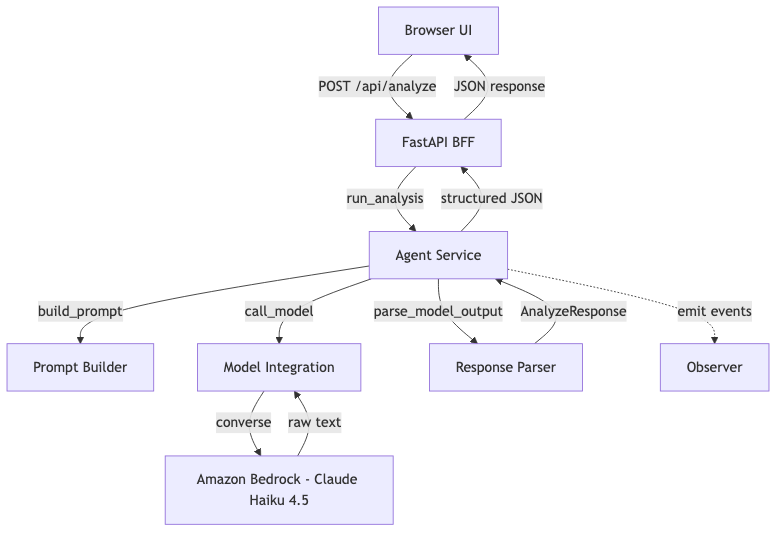
Each layer has one job. The frontend never talks to the model. The BFF never builds prompts. The model layer never parses responses.
Project Structure
app/
  main.py                    # FastAPI entrypoint
  routes/
    analyze.py               # BFF — request handling
  services/
    agent_service.py          # orchestration + observer events
    ai_client.py              # model integration (Bedrock Converse API)
    prompt_builder.py         # prompt construction
    response_parser.py        # raw text → structured output (with JSON extraction)
    observer.py               # event emitter/listener system
  models/
    schemas.py                # Pydantic request/response models
  static/
    index.html / app.js / styles.css
Pattern 1: BFF (Backend for Frontend)
The BFF pattern means the API layer exists for the frontend. It doesn't contain business logic. It validates input, delegates work, and shapes the response.
Here's the full route:
# app/routes/analyze.py

@router.post("/analyze", response_model=AnalyzeResponse)
async def analyze(payload: AnalyzeRequest) -> AnalyzeResponse:
    text = payload.text.strip()
    request_id = uuid.uuid4().hex[:12]

    if not text:
        raise HTTPException(status_code=400, detail="The 'text' field must not be empty.")

    if len(text) > 12000:
        raise HTTPException(status_code=400, detail="Input is too long for this prototype.")

    try:
        return run_analysis(request_id, text)
    except Exception as exc:
        logger.exception("request_id=%s — analysis failed", request_id)
        raise HTTPException(status_code=500, detail="Analysis failed.") from exc
What it does:
- Validates input
- Generates a request ID for tracing
- Delegates to the agent service
- Catches errors and returns clean HTTP responses
What it doesn't do: build prompts, call models, parse responses. That's the agent's job.
Why this matters: When you add a second frontend (mobile app, CLI, Slack bot), you add a second BFF. The agent service stays the same.
Pattern 2: Observer
The Observer pattern decouples "something happened" from "what to do about it."
The implementation is intentionally minimal:
# app/services/observer.py

_listeners: dict[str, list[EventListener]] = defaultdict(list)

def on(event: str, listener: EventListener) -> None:
    _listeners[event].append(listener)

def emit(event: str, data: dict[str, Any] | None = None) -> None:
    for listener in _listeners.get(event, []):
        listener(data or {})
Three functions: on, emit, clear. That's the whole system.
The agent service emits events at each stage of the pipeline:
# app/services/agent_service.py

def run_analysis(request_id: str, user_text: str) -> AnalyzeResponse:
    observer.emit("agent:start", {"request_id": request_id})

    prompt = build_prompt(user_text)
    observer.emit("agent:prompt_built", {"request_id": request_id, "prompt_len": len(prompt)})

    raw = call_model(prompt)
    observer.emit("agent:model_returned", {"request_id": request_id, "raw_len": len(raw)})

    result = parse_model_output(raw)
    observer.emit("agent:complete", {"request_id": request_id, "summary_len": len(result.summary)})

    return result
Right now, nothing listens. And that's fine. The point is that the hooks exist. When you need logging, tracing, metrics, or telemetry — you register a listener. The agent service doesn't change.
# Example: add structured logging later
observer.on("agent:complete", lambda data: logger.info("done", extra=data))
Why this matters: You get observability without modifying the code that does the work.
The Agent Service
This is the orchestration layer. It owns the pipeline:
- Build the prompt
- Call the model
- Parse the response
It's the only place that knows all three steps exist. The BFF doesn't know about prompts. The model layer doesn't know about parsing.
If you later add tool calls, multi-step reasoning, or model routing — this is where it goes. The BFF and model layer stay untouched.
Model Integration: Bedrock Converse API
This was one of the first real lessons in the build.
The initial version used invoke_model — Bedrock's low-level API. It works, but the request and response formats are model-specific. Amazon Nova expects one body shape. Anthropic expects another. Switch models, rewrite the integration.
The fix: switch to the Converse API. It provides a unified interface across all Bedrock models.
# app/services/ai_client.py

def _invoke_bedrock(prompt: str) -> str:
    region = os.getenv("AWS_REGION", "us-east-1")
    model_id = os.getenv("MODEL_ID", "global.anthropic.claude-haiku-4-5-20251001-v1:0")
    client = boto3.client("bedrock-runtime", region_name=region)

    try:
        response = client.converse(
            modelId=model_id,
            messages=[{"role": "user", "content": [{"text": prompt}]}],
        )
    except (ClientError, BotoCoreError) as exc:
        raise RuntimeError(f"Bedrock invocation failed: {exc}") from exc

    try:
        return response["output"]["message"]["content"][0]["text"]
    except (KeyError, IndexError, TypeError) as exc:
        raise RuntimeError("Unexpected model response format.") from exc
Same request format whether you're calling Nova, Claude, Mistral, or Llama. Same response shape. Swap the model ID, everything else stays the same.
The default model is global.anthropic.claude-haiku-4-5-20251001-v1:0 — a cross-region inference profile. Bedrock routes the request to the nearest available region automatically.
Why this matters: The whole point of isolating the model layer is that you can swap models. The Converse API makes that actually true — not just in theory.
JSON Extraction: Handling Real Model Output
Here's something that works perfectly in demo mode and breaks immediately in production: assuming the model returns clean JSON.
The prompt says "Return valid JSON only." The model says "Sure! Here's the JSON:" and wraps it in markdown fences.
Calling json.loads() on that throws a JSONDecodeError. The fix is a small extraction step before parsing:
# app/services/response_parser.py

def _extract_json(raw_text: str) -> str:
    """Pull the first JSON object out of raw model output."""
    # Try stripping markdown fences first
    match = re.search(r"```(?:json)?\s*(\{.*?})\s*```", raw_text, re.DOTALL)
    if match:
        return match.group(1)
    # Fall back to first { ... }
    match = re.search(r"\{.*}", raw_text, re.DOTALL)
    if match:
        return match.group(0)
    return raw_text
It handles three cases:
```json { ... } ```— fenced with language tag``` { ... } ```— bare fencesSome preamble text { ... }— JSON buried in prose
This is defensive parsing. The model is a collaborator, not a contract. You ask for JSON, you usually get JSON, but you build for the times you don't.
Why this matters: Every AI app hits this. The sooner you handle it, the fewer 500 errors you ship.
Testing the Parser
If you're parsing model output, test the weird cases — not just the happy path. These five tests cover the real-world formats models actually return:
def test_parse_clean_json():
    raw = '{"summary":"hello","action_items":["a","b"],"next_step":"ship it"}'
    result = parse_model_output(raw)
    assert result.summary == "hello"

def test_parse_markdown_fenced_json():
    raw = 'Here is the result:\n```json\n{"summary":"fenced","action_items":["x"],"next_step":"go"}\n```'
    result = parse_model_output(raw)
    assert result.summary == "fenced"

def test_parse_json_with_preamble():
    raw = 'Sure, here you go:\n{"summary":"preamble","action_items":[],"next_step":"next"}'
    result = parse_model_output(raw)
    assert result.summary == "preamble"

def test_parse_missing_fields_uses_defaults():
    raw = '{"summary":"","action_items":[],"next_step":""}'
    result = parse_model_output(raw)
    assert result.summary == "No summary returned."

def test_parse_bare_fences():
    raw = '```\n{"summary":"bare","action_items":["a"],"next_step":"done"}\n```'
    result = parse_model_output(raw)
    assert result.summary == "bare"
Clean JSON is the easy case. The ones that save you are markdown_fenced, preamble, and bare_fences — those are the formats that cause JSONDecodeError in production when you only tested with mock data.
Prompt Layer
The prompt builder wraps user input in structured instructions:
def build_prompt(user_text: str) -> str:
    return f"""You are helping turn rough notes into useful output.

Return the response in this exact JSON shape:
{{
  "summary": "short paragraph",
  "action_items": ["item 1", "item 2", "item 3"],
  "next_step": "single recommended next step"
}}

Rules:
- Be concise
- Keep action items practical
- Do not include markdown
- Return valid JSON only

Input:
{user_text}
""".strip()
This is where most of the "intelligence" lives. The model is only as good as the instructions it receives.
Frontend
The frontend is deliberately minimal: a textarea, a button, a result display. No frameworks.
const response = await fetch("/api/analyze", {
  method: "POST",
  headers: { "Content-Type": "application/json" },
  body: JSON.stringify({ text }),
});
const data = await response.json();
renderResults(data);
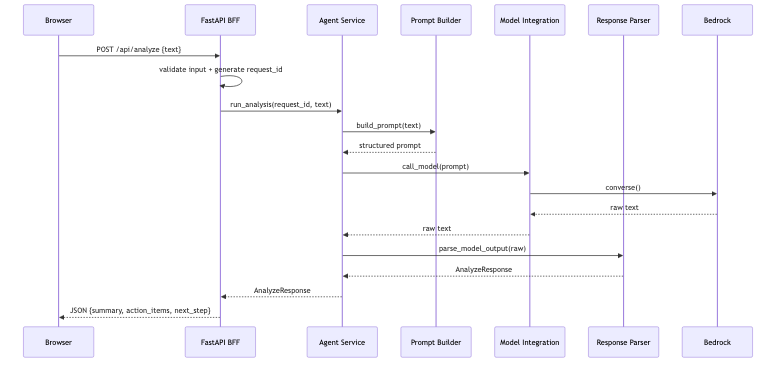
The frontend doesn't know about agents, prompts, or models. It sends text, gets JSON back. That's the BFF contract.
End-to-End Flow
What This Gets You
This is ~200 lines of Python across 7 files. But the separation buys you real things:
| Want to... | Change only... |
|---|---|
| Swap the model | ai_client.py |
| Change the prompt | prompt_builder.py |
| Add logging/tracing | Register an observer |
| Add a mobile frontend | New BFF route |
| Add tool calls or multi-step | agent_service.py |
| Change the response shape | response_parser.py |
Nothing ripples. That's the point.
Running It
git clone https://github.com/jrgwv/thin-slice.git
cd thin-slice
python3 -m venv .venv && source .venv/bin/activate
pip install -r requirements.txt
./start.sh
# Open http://127.0.0.1:8000
Demo mode is on by default — no AWS credentials needed to see it work.
Set DEMO_MODE=false in .env to call Bedrock for real.
Final Thought
This isn't a production system. It's a clean, working slice of one.
That's enough to test the idea, validate the output, and decide what to build next — without untangling a mess when you do.
Build the slice. Not the system.


