

Building Institutional Memory Into Your AI App: Capturing Unstructured Decision Data with Amazon Bedrock Knowledge Bases

Teams don’t lose data—they lose reasoning. A team selects Site 7. The system logs it. But six months later, no one remembers why. That missing “why” is where institutional knowledge actually lives.
This is the difference between an app that records decisions and one that learns from them.
This post walks through how to build the latter end-to-end. We'll intercept the moment a team makes a selection, use an AI agent to capture the rationale in natural conversation, store those decision records in Amazon Bedrock Knowledge Bases, and surface that institutional memory to future teams — all inside the same app they're already using. The stack is React/Node.js on the frontend, Python 3.12+ on the backend, and AWS-native services throughout.
The Problem with Unstructured Institutional Knowledge
Most enterprise apps are good at capturing what happened. They're terrible at capturing why.
In the research site selection context, you might have a database full of selections — site IDs, dates, teams, outcomes — but none of the reasoning that shaped those choices. That reasoning is exactly what makes institutional knowledge valuable. It's the difference between "Team B selected Site 7" and "Team B selected Site 7 because the proximity to the river introduced too much ambient noise at Sites 3 and 12, and the permit turnaround at Site 7 is historically two weeks faster."
The challenge is capturing that reasoning without burdening the team. A form that pops up asking "Why did you choose this site?" will get abandoned inside a week. The better approach is to use the AI agent that's already in the workflow to conduct a brief, conversational debrief — three or four targeted questions, 90 seconds of the team's time — and then automatically package and index that reasoning so it's available to everyone who comes after them.
The Institutional Memory Loop
The core concept is a self-reinforcing cycle we'll call the Institutional Memory Loop. The same agent that helps a team make a decision is also the one that captures the reasoning behind it — and later surfaces that reasoning to the next team facing the same choice. The knowledge base is what closes the loop.
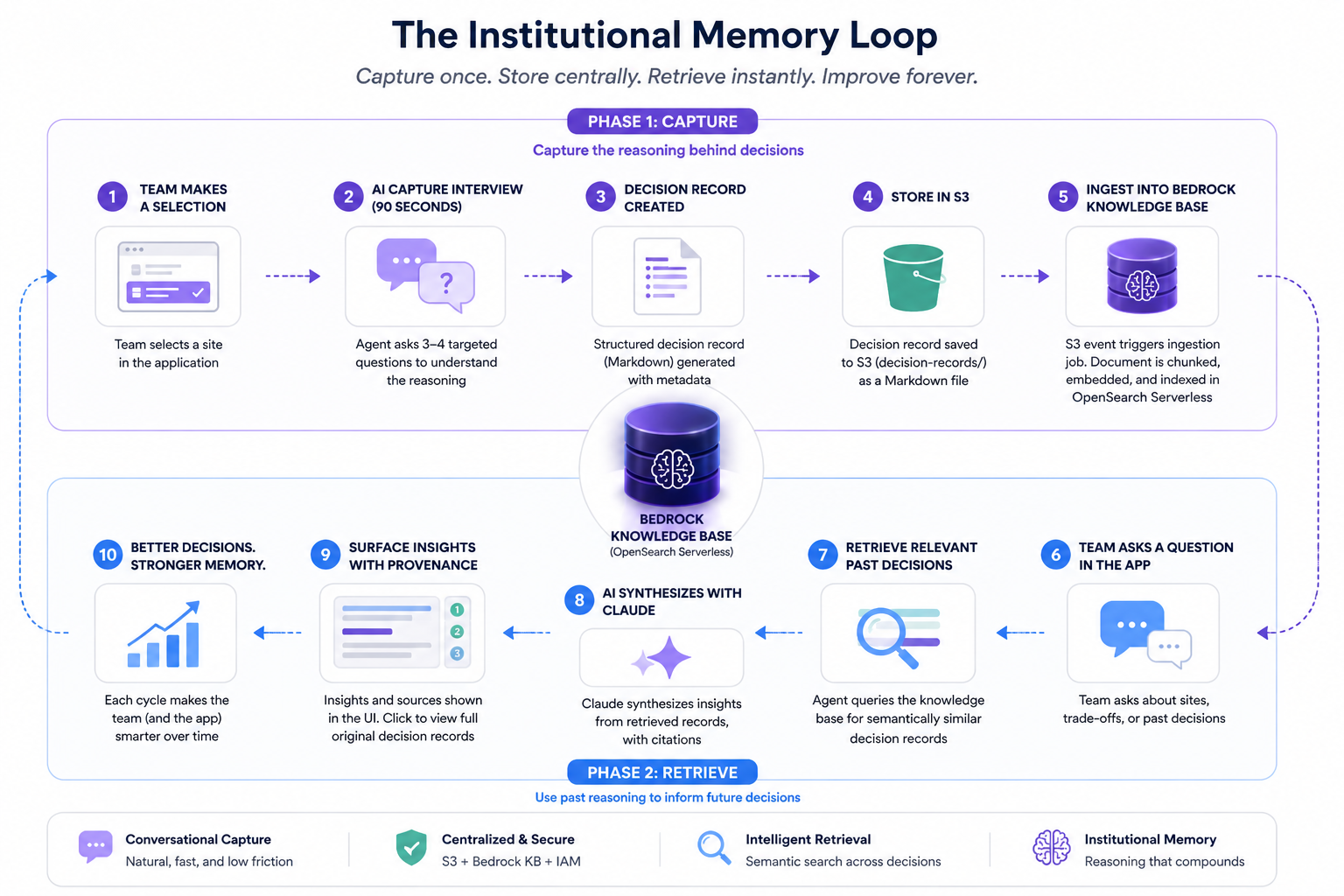
The flow has two phases. In the capture phase (top row), a team selects a site, the agent conducts a 90-second conversational debrief, and a structured decision record lands in S3. An event notification triggers a Bedrock KB ingestion job, embedding the document into an OpenSearch Serverless vector store. In the retrieve phase (bottom row), the next team's agent query hits the knowledge base, pulls relevant past decisions, synthesizes them with Claude, and surfaces the context in the same UI — attributed, with provenance. The app the next team uses looks and feels identical to the one the previous team used. The difference is that it now knows things.
Step 1: Setting Up the Bedrock Knowledge Base
Before wiring up the capture pipeline, you need a knowledge base to receive documents. Amazon Bedrock Knowledge Bases manages the entire RAG infrastructure — chunking, embedding, and storing documents in a vector store — so you don't need to operate OpenSearch directly.
Create the S3 Bucket and IAM Role
# infrastructure/setup_knowledge_base.py
import boto3
import json

s3 = boto3.client("s3", region_name="us-east-1")
iam = boto3.client("iam", region_name="us-east-1")
bedrock_agent = boto3.client("bedrock-agent", region_name="us-east-1")

BUCKET_NAME = "research-decision-records-prod"
KNOWLEDGE_BASE_NAME = "site-selection-decisions-kb"
EMBEDDING_MODEL_ARN = (
    "arn:aws:bedrock:us-east-1::foundation-model/amazon.titan-embed-text-v2:0"
)

# Create the S3 bucket for decision records
s3.create_bucket(Bucket=BUCKET_NAME)

s3.put_bucket_versioning(
    Bucket=BUCKET_NAME,
    VersioningConfiguration={"Status": "Enabled"},
)

# IAM trust policy for Bedrock to access S3 and OpenSearch
trust_policy = {
    "Version": "2012-10-17",
    "Statement": [
        {
            "Effect": "Allow",
            "Principal": {"Service": "bedrock.amazonaws.com"},
            "Action": "sts:AssumeRole",
        }
    ],
}

role = iam.create_role(
    RoleName="BedrockKBRole-SiteDecisions",
    AssumeRolePolicyDocument=json.dumps(trust_policy),
)

iam.attach_role_policy(
    RoleName="BedrockKBRole-SiteDecisions",
    PolicyArn="arn:aws:iam::aws:policy/AmazonS3ReadOnlyAccess",
)

# Create the Bedrock Knowledge Base with OpenSearch Serverless
kb_response = bedrock_agent.create_knowledge_base(
    name=KNOWLEDGE_BASE_NAME,
    description="Institutional knowledge from research site selection decisions",
    roleArn=role["Role"]["Arn"],
    knowledgeBaseConfiguration={
        "type": "VECTOR",
        "vectorKnowledgeBaseConfiguration": {
            "embeddingModelArn": EMBEDDING_MODEL_ARN,
        },
    },
    storageConfiguration={
        "type": "OPENSEARCH_SERVERLESS",
        "opensearchServerlessConfiguration": {
            "collectionArn": "arn:aws:aoss:us-east-1:ACCOUNT_ID:collection/COLLECTION_ID",
            "vectorIndexName": "site-decisions-index",
            "fieldMapping": {
                "vectorField": "embedding",
                "textField": "text",
                "metadataField": "metadata",
            },
        },
    },
)

knowledge_base_id = kb_response["knowledgeBase"]["knowledgeBaseId"]

# Add the S3 data source
bedrock_agent.create_data_source(
    knowledgeBaseId=knowledge_base_id,
    name="decision-records-s3",
    dataSourceConfiguration={
        "type": "S3",
        "s3Configuration": {
            "bucketArn": f"arn:aws:s3:::{BUCKET_NAME}",
            "inclusionPrefixes": ["decision-records/"],
        },
    },
    vectorIngestionConfiguration={
        "chunkingConfiguration": {
            "chunkingStrategy": "SEMANTIC",
            "semanticChunkingConfiguration": {
                "maxTokens": 300,
                "bufferSize": 1,
                "breakpointPercentileThreshold": 95,
            },
        }
    },
)

print(f"Knowledge Base ID: {knowledge_base_id}")
A few things worth calling out here. The SEMANTIC chunking strategy is intentional — decision records are narrative text, and semantic chunking preserves the logical boundaries of the reasoning rather than slicing arbitrarily by token count. You get better retrieval quality on conversational documents this way.
Why OpenSearch Serverless over managed OpenSearch Service? At this stage of the project, you don't need the operational depth that full OpenSearch gives you. Managed OpenSearch requires you to provision and right-size clusters, configure shard counts and replica topology, manage index lifecycle policies, and handle version upgrades. For a knowledge base that grows incrementally — a few decision records per week — that's overhead with no payoff. OpenSearch Serverless scales on demand and has zero cluster management surface. Bedrock Knowledge Bases provisions and manages the Serverless collection for you, so your interaction with the underlying vector store is exactly zero lines of infrastructure code. If you later need custom analyzers, fine-grained index control, or extremely high-throughput ingest, graduating to managed OpenSearch is a straightforward migration — but start serverless and earn that complexity.
Step 2: The AI-Assisted Capture Flow
This is the most important piece of the puzzle, because all the infrastructure in the world is worthless if teams don't actually generate decision records.
The approach here is to hook into the existing site selection flow. When a team confirms a site selection in the React app, the frontend emits a SITE_SELECTED event to the backend, which spins up a short debrief conversation via the AI agent. The agent asks three to four targeted questions, collects the answers, and then formats a structured decision record document automatically. The team never fills out a form.
React: Triggering the Capture Flow
// src/hooks/useDecisionCapture.ts
import { useState, useCallback } from "react";

interface CaptureSession {
  sessionId: string;
  messages: Array<{ role: "assistant" | "user"; content: string }>;
  isComplete: boolean;
}

export function useDecisionCapture() {
  const [session, setSession] = useState<CaptureSession | null>(null);
  const [isLoading, setIsLoading] = useState(false);

  const startCapture = useCallback(
    async (siteId: string, selectionId: string) => {
      setIsLoading(true);
      try {
        const response = await fetch("/api/decisions/start-capture", {
          method: "POST",
          headers: { "Content-Type": "application/json" },
          body: JSON.stringify({ siteId, selectionId }),
        });
        const data = await response.json();
        setSession({
          sessionId: data.sessionId,
          messages: [{ role: "assistant", content: data.firstQuestion }],
          isComplete: false,
        });
      } finally {
        setIsLoading(false);
      }
    },
    []
  );

  const sendAnswer = useCallback(
    async (answer: string) => {
      if (!session) return;
      setIsLoading(true);
      try {
        const response = await fetch("/api/decisions/respond", {
          method: "POST",
          headers: { "Content-Type": "application/json" },
          body: JSON.stringify({ sessionId: session.sessionId, answer }),
        });
        const data = await response.json();
        setSession((prev) =>
          prev
            ? {
                ...prev,
                messages: [
                  ...prev.messages,
                  { role: "user", content: answer },
                  { role: "assistant", content: data.nextMessage },
                ],
                isComplete: data.isComplete,
              }
            : null
        );
      } finally {
        setIsLoading(false);
      }
    },
    [session]
  );

  return { session, isLoading, startCapture, sendAnswer };
}
// src/components/DecisionCapture.tsx
import { useDecisionCapture } from "../hooks/useDecisionCapture";

interface Props {
  siteId: string;
  selectionId: string;
  onComplete: () => void;
}

export function DecisionCapture({ siteId, selectionId, onComplete }: Props) {
  const { session, isLoading, startCapture, sendAnswer } = useDecisionCapture();
  const [input, setInput] = useState("");

  useEffect(() => {
    startCapture(siteId, selectionId);
  }, [siteId, selectionId]);

  useEffect(() => {
    if (session?.isComplete) {
      setTimeout(onComplete, 1500);
    }
  }, [session?.isComplete]);

  return (
    <div className="decision-capture-panel">
      <h3>Help us capture why you chose this site</h3>
      <p className="subtext">
        Just a few quick questions — your answers build the team's knowledge base
      </p>
      <div className="messages">
        {session?.messages.map((msg, i) => (
          <div key={i} className={`message ${msg.role}`}>
            {msg.content}
          </div>
        ))}
      </div>
      {!session?.isComplete && (
        <form
          onSubmit={(e) => {
            e.preventDefault();
            sendAnswer(input);
            setInput("");
          }}
        >
          <input
            value={input}
            onChange={(e) => setInput(e.target.value)}
            placeholder="Type your answer..."
            disabled={isLoading}
          />
          <button type="submit" disabled={isLoading || !input.trim()}>
            Send
          </button>
        </form>
      )}
      {session?.isComplete && (
        <p className="complete">✓ Decision captured — thanks!</p>
      )}
    </div>
  );
}
The key UX principle here is framing. "Help us capture why you chose this site" is far less threatening than "Fill out this form." Keeping the capture panel lightweight and conversational is what gets adoption.
Node.js: API Routes for the Capture Session
The Node.js layer is thin — its job is to create a session ID, proxy requests to the Python Lambda, and clean up the session map when the capture completes. Two routes: POST /api/decisions/start-capture initializes the session and returns the first question, and POST /api/decisions/respond passes each answer through and returns the next prompt or the completion signal.
// src/api/decisions.ts (Express routes — full implementation in repo)
import express from "express";
import { v4 as uuidv4 } from "uuid";
import { Lambda } from "@aws-sdk/client-lambda";

const router = express.Router();
const lambda = new Lambda({ region: "us-east-1" });

// In production, replace this Map with DynamoDB or ElastiCache
const captureSessions = new Map<string, { siteId: string; selectionId: string }>();

router.post("/start-capture", async (req, res) => {
  const { siteId, selectionId } = req.body;
  const sessionId = uuidv4();
  captureSessions.set(sessionId, { siteId, selectionId });

  const result = await lambda.invoke({
    FunctionName: "decision-capture-handler",
    Payload: JSON.stringify({ action: "start", sessionId, siteId, selectionId }),
  });

  const response = JSON.parse(Buffer.from(result.Payload!).toString());
  res.json({ sessionId, firstQuestion: response.message });
});

router.post("/respond", async (req, res) => {
  const { sessionId, answer } = req.body;
  const sessionData = captureSessions.get(sessionId);
  if (!sessionData) return res.status(404).json({ error: "Session not found" });

  const result = await lambda.invoke({
    FunctionName: "decision-capture-handler",
    Payload: JSON.stringify({ action: "respond", sessionId, answer, ...sessionData }),
  });

  const response = JSON.parse(Buffer.from(result.Payload!).toString());
  if (response.isComplete) captureSessions.delete(sessionId);
  res.json(response);
});

export default router;
Step 3: The Python Lambda — Conducting the Capture Interview
This Lambda is the heart of the system. It uses the Bedrock Converse API to run a multi-turn conversation with a specific goal: extract the team's decision rationale and package it into a structured document.
# lambdas/decision_capture_handler/handler.py
import json
import os
import boto3
from datetime import datetime, timezone
from typing import Any

bedrock = boto3.client("bedrock-runtime", region_name="us-east-1")
dynamodb = boto3.resource("dynamodb", region_name="us-east-1")
s3 = boto3.client("s3", region_name="us-east-1")

SESSIONS_TABLE = dynamodb.Table(os.environ["SESSIONS_TABLE"])
DECISION_RECORDS_BUCKET = os.environ["DECISION_RECORDS_BUCKET"]
MODEL_ID = "global.anthropic.claude-sonnet-4-5-20250929-v1:0"

CAPTURE_SYSTEM_PROMPT = """You are a knowledge capture specialist embedded in a research site selection application.
Your job is to conduct a brief, friendly debrief with researchers after they select a study site.

Your goal is to extract, in natural conversation, the following information:
1. The primary factors that made this site the right choice
2. The main alternatives that were seriously considered and why they were passed over
3. Any constraints or risks that influenced the decision
4. What success looks like for this site selection

Rules:
- Ask one question at a time, never multiple at once
- Keep your questions concise and specific — researchers are busy
- After the researcher answers your 4th question, output a special JSON block formatted EXACTLY like this:

<DECISION_RECORD>
{
  "primary_factors": "summary of key selection factors",
  "alternatives_considered": "summary of alternatives and why they were rejected",
  "constraints_and_risks": "summary of constraints or risks",
  "success_criteria": "what success looks like",
  "raw_conversation_summary": "brief narrative summary of the full conversation"
}
</DECISION_RECORD>

Then end with a brief, warm closing message thanking the researcher.

Start your first message with a single, direct opening question about the primary factors behind their choice.
Do NOT introduce yourself or explain what you're doing — just ask the question naturally."""


def lambda_handler(event: dict[str, Any], context: Any) -> dict[str, Any]:
    action = event["action"]
    session_id = event["sessionId"]
    site_id = event["siteId"]
    selection_id = event["selectionId"]

    if action == "start":
        return handle_start(session_id, site_id, selection_id)
    elif action == "respond":
        return handle_respond(session_id, event["answer"], site_id, selection_id)

    raise ValueError(f"Unknown action: {action}")


def handle_start(session_id: str, site_id: str, selection_id: str) -> dict:
    """Initialize a capture session and get the first question."""
    response = bedrock.converse(
        modelId=MODEL_ID,
        system=[{"text": CAPTURE_SYSTEM_PROMPT}],
        messages=[
            {
                "role": "user",
                "content": [
                    {
                        "text": (
                            f"A researcher just selected Site {site_id} for their study. "
                            "Please begin the debrief."
                        )
                    }
                ],
            }
        ],
        inferenceConfig={"maxTokens": 300, "temperature": 0.3},
    )

    first_question = response["output"]["message"]["content"][0]["text"]

    # Persist the conversation history to DynamoDB
    SESSIONS_TABLE.put_item(
        Item={
            "sessionId": session_id,
            "siteId": site_id,
            "selectionId": selection_id,
            "messages": [
                {
                    "role": "user",
                    "content": (
                        f"A researcher just selected Site {site_id} for their study. "
                        "Please begin the debrief."
                    ),
                },
                {"role": "assistant", "content": first_question},
            ],
            "questionCount": 1,
            "ttl": int(datetime.now(timezone.utc).timestamp()) + 3600,  # 1hr TTL
        }
    )

    return {"message": first_question, "isComplete": False}


def handle_respond(
    session_id: str, answer: str, site_id: str, selection_id: str
) -> dict:
    """Process a researcher's answer and return the next question or finalize."""
    session = SESSIONS_TABLE.get_item(Key={"sessionId": session_id})["Item"]
    messages = session["messages"]
    question_count = int(session["questionCount"])

    # Append the researcher's answer
    messages.append({"role": "user", "content": answer})

    # Build the Converse messages payload
    converse_messages = [
        {"role": msg["role"], "content": [{"text": msg["content"]}]}
        for msg in messages
    ]

    response = bedrock.converse(
        modelId=MODEL_ID,
        system=[{"text": CAPTURE_SYSTEM_PROMPT}],
        messages=converse_messages,
        inferenceConfig={"maxTokens": 600, "temperature": 0.3},
    )

    assistant_message = response["output"]["message"]["content"][0]["text"]
    messages.append({"role": "assistant", "content": assistant_message})

    # Check if the model has produced a completed decision record
    is_complete = "<DECISION_RECORD>" in assistant_message

    if is_complete:
        decision_data = extract_decision_record(assistant_message)
        closing_message = assistant_message.split("</DECISION_RECORD>")[-1].strip()

        # Write the decision record to S3 asynchronously
        write_decision_record(
            site_id=site_id,
            selection_id=selection_id,
            decision_data=decision_data,
            full_messages=messages,
        )

        # Update session state
        SESSIONS_TABLE.update_item(
            Key={"sessionId": session_id},
            UpdateExpression="SET messages = :m, questionCount = :q",
            ExpressionAttributeValues={":m": messages, ":q": question_count + 1},
        )

        return {"message": closing_message or "Thanks! Decision captured.", "isComplete": True}

    # Update session and continue the conversation
    SESSIONS_TABLE.update_item(
        Key={"sessionId": session_id},
        UpdateExpression="SET messages = :m, questionCount = :q",
        ExpressionAttributeValues={":m": messages, ":q": question_count + 1},
    )

    return {"message": assistant_message, "isComplete": False}


def extract_decision_record(text: str) -> dict:
    """Parse the JSON block the model produces when capture is complete."""
    start = text.find("<DECISION_RECORD>") + len("<DECISION_RECORD>")
    end = text.find("</DECISION_RECORD>")
    json_block = text[start:end].strip()
    return json.loads(json_block)


def write_decision_record(
    site_id: str,
    selection_id: str,
    decision_data: dict,
    full_messages: list,
) -> None:
    """Format and upload the decision record to S3 for KB ingestion."""
    timestamp = datetime.now(timezone.utc).isoformat()

    # Format as a rich markdown document — narrative text chunks better for RAG
    document = f"""# Site Selection Decision Record

**Site ID:** {site_id}
**Selection ID:** {selection_id}
**Captured At:** {timestamp}

## Why This Site Was Selected

{decision_data.get("primary_factors", "Not captured")}

## Alternatives Considered

{decision_data.get("alternatives_considered", "Not captured")}

## Constraints and Risks Acknowledged

{decision_data.get("constraints_and_risks", "Not captured")}

## Success Criteria

{decision_data.get("success_criteria", "Not captured")}

## Summary

{decision_data.get("raw_conversation_summary", "Not captured")}
"""

    s3_key = f"decision-records/site-{site_id}/{selection_id}.md"

    s3.put_object(
        Bucket=DECISION_RECORDS_BUCKET,
        Key=s3_key,
        Body=document.encode("utf-8"),
        ContentType="text/markdown",
        Metadata={
            "site-id": site_id,
            "selection-id": selection_id,
            "captured-at": timestamp,
        },
    )
A few design decisions here worth explaining. First, conversations are persisted to DynamoDB with a 1-hour TTL — this keeps the Lambda stateless while maintaining context across the multi-turn conversation without expensive in-memory solutions.
A note on DynamoDB vs. Amazon Bedrock AgentCore Memory: AgentCore Memory (formerly Bedrock Agent memory store) is purpose-built for persistent, cross-session agent memory — it's the right tool when an agent needs to remember facts about a user or ongoing project across many separate conversations over weeks or months. For this use case, each capture session is short-lived (under 10 minutes) and completely self-contained. You just need a scratchpad to hold the conversation history between Lambda invocations for a single session, and then you're done with it. DynamoDB with a 1-hour TTL is cheaper, simpler, already in most teams' AWS footprints, and doesn't add a dependency on a newer managed service. That said, if you later extend this system so the AI agent builds a persistent profile of each researcher's preferences and patterns over time — that's exactly the use case AgentCore Memory is designed for, and it would be worth revisiting then.
Second, the decision record is formatted as markdown rather than JSON because text documents chunk and embed significantly better for retrieval. The headers give the embeddings semantic structure without requiring you to write a custom chunking strategy. Third, the system prompt uses a <DECISION_RECORD> XML tag as a completion signal rather than a fixed question count — this lets the model handle researchers who are more or less verbose without cutting them off mid-thought.
Step 4: Triggering the Bedrock Knowledge Base Sync
Once the decision record lands in S3, you need to ingest it into the knowledge base. You can either run a scheduled sync or trigger it on every new document. For this use case — where capture happens infrequently but recency matters — an S3 event-triggered sync is the right call.
# lambdas/kb_sync_trigger/handler.py
import os
import boto3
from typing import Any

bedrock_agent = boto3.client("bedrock-agent", region_name="us-east-1")

KNOWLEDGE_BASE_ID = os.environ["KNOWLEDGE_BASE_ID"]
DATA_SOURCE_ID = os.environ["DATA_SOURCE_ID"]


def lambda_handler(event: dict[str, Any], context: Any) -> None:
    """Triggered by S3 PutObject events under decision-records/"""
    for record in event["Records"]:
        bucket = record["s3"]["bucket"]["name"]
        key = record["s3"]["object"]["key"]

        print(f"New decision record: s3://{bucket}/{key}")

        # Start an ingestion job — Bedrock will pick up all new/modified S3 objects
        response = bedrock_agent.start_ingestion_job(
            knowledgeBaseId=KNOWLEDGE_BASE_ID,
            dataSourceId=DATA_SOURCE_ID,
        )

        job_id = response["ingestionJob"]["ingestionJobId"]
        print(f"Started KB ingestion job: {job_id}")
Wire this Lambda up with an S3 event notification on ObjectCreated events under the decision-records/ prefix. The ingestion job runs asynchronously — typically takes 30 to 90 seconds for small document sets — so the knowledge base is updated within a couple of minutes of each capture.
For the S3 notification configuration in CDK or CloudFormation:
# infrastructure/app_stack.py (CDK)
from aws_cdk import (
    aws_s3 as s3,
    aws_s3_notifications as s3_notifications,
    aws_lambda as lambda_,
)

decision_bucket.add_event_notification(
    s3.EventType.OBJECT_CREATED,
    s3_notifications.LambdaDestination(kb_sync_lambda),
    s3.NotificationKeyFilter(prefix="decision-records/"),
)
Step 5: Querying the Knowledge Base in the Agent
Now comes the payoff. When a team is working through site selection and the agent is providing context, it should be able to retrieve relevant past decisions and surface them naturally. Here's how to query the knowledge base and integrate the results into the agent's response.
# lambdas/site_selection_agent/knowledge_retriever.py
import os
import boto3
from dataclasses import dataclass

bedrock_agent_runtime = boto3.client("bedrock-agent-runtime", region_name="us-east-1")
bedrock = boto3.client("bedrock-runtime", region_name="us-east-1")

KNOWLEDGE_BASE_ID = os.environ["KNOWLEDGE_BASE_ID"]


@dataclass
class DecisionContext:
    relevant_decisions: list[str]
    sites_referenced: list[str]
    summary: str


def retrieve_relevant_decisions(query: str, site_ids: list[str]) -> DecisionContext:
    """
    Retrieve past decision records relevant to the current selection context.

    Args:
        query: Natural language description of the current selection scenario
        site_ids: Site IDs being considered in the current decision

    Returns:
        DecisionContext with retrieved passages and a synthesized summary
    """
    # Build a rich retrieval query
    retrieval_query = (
        f"Research site selection decision: {query}. "
        f"Sites being evaluated: {', '.join(site_ids)}. "
        "What factors influenced past selections of these or similar sites? "
        "What alternatives were considered and why were they rejected?"
    )

    response = bedrock_agent_runtime.retrieve(
        knowledgeBaseId=KNOWLEDGE_BASE_ID,
        retrievalQuery={"text": retrieval_query},
        retrievalConfiguration={
            "vectorSearchConfiguration": {
                "numberOfResults": 5,
                "overrideSearchType": "HYBRID",  # semantic + keyword
            }
        },
    )

    results = response["retrievalResults"]

    if not results:
        return DecisionContext(
            relevant_decisions=[],
            sites_referenced=[],
            summary="No prior decision records found for these sites.",
        )

    passages = [r["content"]["text"] for r in results]
    sites_referenced = list({
        r["metadata"].get("site-id", "unknown")
        for r in results
        if "metadata" in r
    })

    # Use Claude to synthesize the retrieved passages into useful context
    synthesis_prompt = f"""You are summarizing past research site selection decisions to help a team make a new decision.

Retrieved decision records:
{chr(10).join(f"---{chr(10)}{p}" for p in passages)}

Current selection context: {query}

Provide a concise summary (3-5 sentences) of what past decisions reveal about the sites being considered.
Focus on factors that would be useful to the current team. Do not invent information not present in the records."""

    synthesis = bedrock.converse(
        modelId="global.anthropic.claude-haiku-4-5-20251001-v1:0",  # Haiku 4.5 via global inference profile
        messages=[{"role": "user", "content": [{"text": synthesis_prompt}]}],
        inferenceConfig={"maxTokens": 400, "temperature": 0.1},
    )

    return DecisionContext(
        relevant_decisions=passages,
        sites_referenced=sites_referenced,
        summary=synthesis["output"]["message"]["content"][0]["text"],
    )
# lambdas/site_selection_agent/handler.py
import json
import os
import boto3
from knowledge_retriever import retrieve_relevant_decisions

bedrock = boto3.client("bedrock-runtime", region_name="us-east-1")
MODEL_ID = "global.anthropic.claude-sonnet-4-5-20250929-v1:0"

AGENT_SYSTEM_PROMPT = """You are a research site selection assistant. You help research teams
evaluate and select the most appropriate sites for their studies.

When you have access to past decision context, you should reference it explicitly —
e.g., "Based on past selections, teams have found that Site 7's proximity to..."

Always cite the institutional context you're drawing on so teams know this is validated
experience rather than general advice."""


def lambda_handler(event: dict, context) -> dict:
    user_message = event["message"]
    site_ids = event.get("siteIds", [])
    conversation_history = event.get("history", [])

    # Retrieve relevant past decisions from the knowledge base
    decision_context = retrieve_relevant_decisions(
        query=user_message,
        site_ids=site_ids,
    )

    # Inject the retrieved context into the system prompt
    augmented_system = AGENT_SYSTEM_PROMPT
    if decision_context.relevant_decisions:
        augmented_system += f"""

## Institutional Knowledge from Past Decisions

{decision_context.summary}

The following sites have prior decision records available: {', '.join(decision_context.sites_referenced)}.
Use this context to ground your recommendations in your team's actual experience."""

    # Build the messages payload
    messages = conversation_history + [
        {"role": "user", "content": [{"text": user_message}]}
    ]

    response = bedrock.converse(
        modelId=MODEL_ID,
        system=[{"text": augmented_system}],
        messages=messages,
        inferenceConfig={"maxTokens": 800, "temperature": 0.4},
    )

    assistant_reply = response["output"]["message"]["content"][0]["text"]

    return {
        "reply": assistant_reply,
        "contextUsed": len(decision_context.relevant_decisions) > 0,
        "sitesWithHistory": decision_context.sites_referenced,
    }
The HYBRID search mode in the retrieval call is deliberate. Pure semantic search is great for conceptual similarity but can miss exact site ID matches when a team asks specifically about Site 7. Hybrid search combines vector similarity with BM25 keyword matching, so you get both the semantic richness and the precision.
Step 6: Surfacing the Context in the UI
The final piece is making the retrieved institutional knowledge visible to the team in a way that builds trust and encourages continued use of the capture feature.
// src/components/SiteSelectionAgent.tsx
interface AgentResponse {
  reply: string;
  contextUsed: boolean;
  sitesWithHistory: string[];
}

function AgentResponseCard({ response }: { response: AgentResponse }) {
  return (
    <div className="agent-response">
      <p>{response.reply}</p>
      {response.contextUsed && (
        <div className="context-badge">
          <span className="icon">🗂</span>
          <span>
            Drawing on past decisions for{" "}
            {response.sitesWithHistory.join(", ")}
          </span>
        </div>
      )}
    </div>
  );
}
The contextUsed badge is small but important. It tells the team that the agent's response is grounded in their organization's actual history, not just general knowledge. That provenance signal is what builds confidence in the system over time — and what motivates teams to keep doing the 90-second debrief.
Best Practices and Common Pitfalls
Document formatting matters more than you'd think. The Bedrock Knowledge Base will chunk whatever you put in S3, and how you format that content directly affects retrieval quality. Markdown with descriptive headers (## Why This Site Was Selected) gives the embedding model semantic anchors. A flat JSON blob gives it nothing. Always store decision records as human-readable narrative text.
Keep capture sessions short and the questions specific. The system prompt used here targets four questions. You can tune this, but resist the temptation to ask for more. Teams that feel the debrief is too long will start dismissing the capture panel. Four focused questions with follow-ups beats ten exhaustive ones with no answers.
Use metadata filters for scoping. As the knowledge base grows, you'll want to allow queries that are scoped to specific time ranges, research programs, or geographic regions. Store those attributes as S3 object metadata and use Bedrock's filter parameter in retrieve() calls to prevent knowledge from one program contaminating recommendations for another.
Plan for knowledge base latency in the selection flow. The retrieve() call typically takes 300 to 700ms. For the selection assistant context panel — which is displayed while the team is evaluating options — this is fine. Don't put a KB retrieval call in the critical path of a page load.
Monitor ingestion job failures. The start_ingestion_job call fires and forgets. Wire up a CloudWatch alarm on the bedrock:IngestionJobFailed metric so you know when a document failed to ingest. Document parsing errors are the most common culprit, usually from encoding issues in the uploaded text.
Seed the knowledge base before launch. If you have historical meeting notes, email threads, or any documentation about past site selections, process and upload them before the app goes live. A knowledge base that returns zero results for the first three months trains users that it's useless. Even 20 to 30 bootstrapped decision records make a significant difference to early retrieval quality.
Where This Pattern Applies
Research site selection is the lens we used, but the Institutional Memory Loop is domain-agnostic. Any workflow where teams make high-stakes judgment calls that the organization wants to learn from over time is a candidate. A few concrete translations:
Clinical trial site selection. The same problem, higher stakes. CROs and sponsors evaluate dozens of sites per study and rarely document why Site A got the nod over Site B — investigator experience, patient retention history, IRB turnaround, local regulatory climate. That reasoning is enormously valuable to the next team running a similar indication. The capture and retrieval architecture is identical; only the domain vocabulary in the system prompt changes.
Architectural Decision Records (ADRs). Most engineering teams treat ADRs as a documentation chore that happens after the decision, if at all. Embedding a capture step directly into the pull request or design review workflow — where an agent asks "What alternatives did you consider and why did you rule them out?" — produces ADRs that are actually filled out, indexed, and retrievable when the next engineer is making the same tradeoff eighteen months later.
Vendor and procurement selection. Procurement teams evaluate vendors constantly and keep almost none of the comparative reasoning. Why did Security team veto Vendor X? Why did the integration story on Vendor Y win over Vendor Z's lower price? That context prevents organizations from re-evaluating the same vendor over and over, or re-learning the same lessons about a category. A post-selection debrief in the procurement tool closes that loop.
GTM and pricing decisions. Why did a drug go to market at $X? Why was a particular region sequenced before another? These decisions involve complex tradeoffs across regulatory, commercial, and manufacturing inputs, and the reasoning is almost never written down in a form that the next product team can find and learn from. A knowledge base seeded with past decision rationale gives new teams a starting point that isn't blank.
The common thread across all of these: the value isn't in the decision itself — it's in the reasoning that produced it. The Institutional Memory Loop is just a systematic way of making sure that reasoning survives the people who held it.
Wrapping Up
Three things determine whether the Institutional Memory Loop actually works in practice: making capture frictionless (which is why the AI-assisted debrief beats a form), formatting documents for retrieval quality (which is why markdown with headers beats flat JSON), and making retrieved knowledge visible and attributed in the UI so teams trust it and keep feeding it.
Systems don’t become intelligent when they store more data. They become intelligent when they remember why decisions were made. The only way that happens is if you design for it.
Code samples in this post use global.anthropic.claude-sonnet-4-5-20250929-v1:0 (Claude Sonnet 4.5 global inference profile, launched September 30, 2025) for the main agent, global.anthropic.claude-haiku-4-5-20251001-v1:0 (Claude Haiku 4.5 global inference profile) for the synthesis step, and amazon.titan-embed-text-v2:0 for embeddings. The global. prefix routes requests across AWS regions automatically for higher availability — see the Amazon Bedrock cross-region inference documentation for details. Check the Amazon Bedrock model IDs documentation for the latest available model strings in your region.
Lambda functions are deployed with Python 3.12 runtime minimum (identifier: python3.12, based on Amazon Linux 2023). Python 3.13 (python3.13, released November 2024) and Python 3.14 (python3.14, released November 2025) are also available on Lambda and both run on Amazon Linux 2023 — either is a solid choice if you want the latest language features. Python 3.11 and earlier are on an older Amazon Linux 2 base and approaching end of support; there's no reason to target them for new projects. All code in this post is compatible with 3.12 through 3.14. Regardless of runtime version, package boto3 in your deployment zip or use the AWS-provided managed layer.


